 SheetWorkflow Guide
Separate single-condition and multiple-condition counts
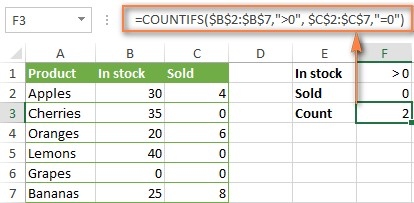
COUNTIF counts cells against one condition, while COUNTIFS can evaluate criteria across corresponding ranges. The source covers numbers, text, dates, and other common comparison types. Each COUNTIFS range is paired with its criterion, allowing a row to qualify only when the required comparisons are satisfied. This makes the formula's structure an expression of the actual question rather than a collection of unrelated counts.
Decide whether the logic is AND or OR
Multiple conditions can mean that all requirements must hold or that any one is sufficient. Those are different counting tasks, and the article discusses approaches to both. Before combining formulas, describe the intended rule and consider whether a record could match more than one branch. This is especially important with OR logic, where careless addition can count the same record twice. Clear criteria definitions are the foundation of a useful result.



















Comments (0)