 SheetWorkflow Guide
Structured references identify data through an Excel table's name and column headings instead of only cell coordinates. For example, SUM(Table1[Sales]) totals the Sales field in Table1. That wording can be easier to interpret than a bare range when several tables share a workbook.
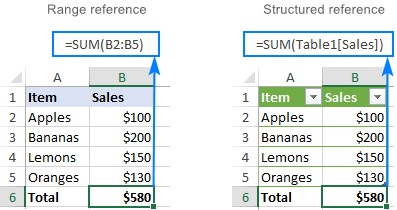
These references respond to changes in the table. Renaming a column updates its references, and adding rows extends the relevant data automatically. They work in formulas inside or outside the table. A calculated column can also fill the same calculation down its rows, reducing repeated manual entry. Check that the source is an actual Excel table before expecting ordinary ranges to behave this way.



















Comments (0)