 SheetWorkflow Guide
Convert Text-Typed Excel Amounts into Real Numbers
Imported values can look numeric while remaining text, causing unexpected arithmetic and lookup behavior in Excel.
Imported values can look numeric while remaining text, causing unexpected arithmetic and lookup behavior in Excel.

Excel can combine separate first-name and last-name columns using the ampersand operator or a concatenation function.

Extracting domain names can make a long Excel URL list easier to group and compare.

External workbook references can appear in formulas, defined names, objects, and charts.

An ordinary Excel comparison such as A1=B1 ignores differences in letter case and returns TRUE or FALSE.

Nested SUBSTITUTE functions can perform several text replacements in one Excel formula.

LOWER converts text to lowercase, UPPER produces uppercase, and PROPER capitalizes words.

Selecting blank cells and then deleting their entire rows can remove valid Excel records.

The source describes the built-in Data, Data cleanup, Remove duplicates command.

Excel duplicate cleanup can concern repeated cells, complete duplicate rows, or matches based on only selected fields.

Google Sheets provides a built-in removal tool through Data, Data cleanup, Remove duplicates.

ISTEXT checks whether an Excel value is text and returns TRUE or FALSE.

TEXT can convert an Excel date into a text string using a specified format code.

Some numeric-looking Excel fields represent identifiers rather than quantities.

Dates may arrive as text when copied from another source or entered into cells that were already formatted as text.

Text to Columns can separate combined information, such as names, without manually editing every cell.

Excel's Find and Replace can search within a selected range, a worksheet, or a workbook.

CLEAN removes nonprinting characters from Excel text, including line-break and control characters described in the Ablebits guide.

Data imported from a CSV file or another system may look like dates while remaining text in Excel.
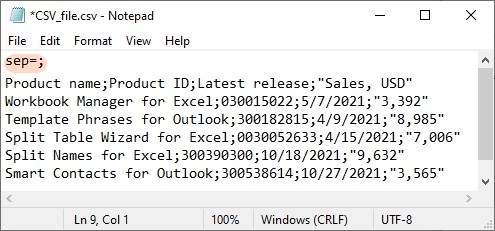
A CSV file may use a different field separator from the one Excel expects under the current regional settings.

