 SheetWorkflow Guide
Make PivotTable Filters Visible with Slicers
Slicers provide clickable controls for filtering an Excel PivotTable.
Slicers provide clickable controls for filtering an Excel PivotTable.

Chart titles and axis titles give Excel readers different kinds of context.

Excel can add a trendline or moving average to an appropriate chart series.

A chart title or data label can be linked to a worksheet cell.

An Excel trendline represents the general direction of data rather than connecting every actual observation.

Excel's Format Data Labels pane controls which information appears beside chart values, including category names, series names and percentages where supported.

Microsoft's Excel 2016 tutorial introduces importing data and building a Data Model through an Olympics example.

Excel for Mac creates sparklines from a selected data range and an output location.

The source describes a slicer as a visible way to filter a table, using a country field as an example.

Analyze Data in Excel can produce visual summaries and suggested insights from a selected range.

Creating a sparkline requires both the source data range and the worksheet location where the small chart should appear.

Excel's Quick Analysis tool appears beside a selected range and offers access to tables, charts, sparklines, and other analysis options.

Excel chart patterns can help distinguish data series when color printing is unavailable.

Microsoft describes chart creation as a sequence that starts with suitable data, chooses a chart, and then refines the details.

Excel provides snap options for arranging shapes and other objects in a worksheet report.
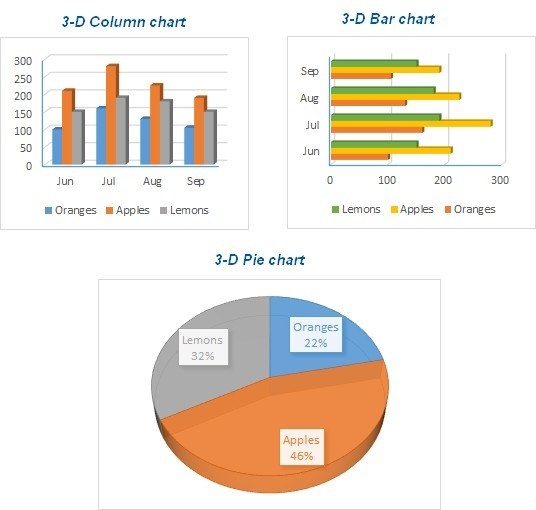
Excel charts can represent numeric information through bars, columns, lines, slices, and other visual forms.

Microsoft's bell curve guide builds a demonstration with sample values, a mean and a standard deviation.

Excel lets you reposition data labels through preset locations or by dragging them.

Excel can continue a numerical series using either a repeated addition or a repeated multiplication.
A chart title, label or text box can display the contents of a worksheet cell through a reference.

