 SheetWorkflow Guide
Excel's Subtotal command adds summaries when a chosen grouping value changes. Sort the source by that grouping column first and remove blank rows that would interrupt the list. Otherwise, repeated categories in separate places can create a confusing sequence of partial subtotals.
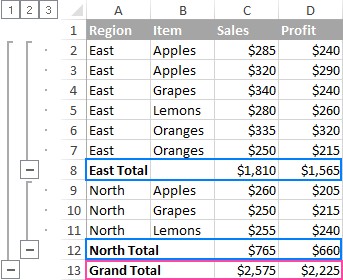
Select a cell in the intended dataset and open Subtotal from the Data tab's Outline group. Specify the grouping column, the summary function and the numeric columns to summarize. Excel then builds an outline alongside the inserted summaries, allowing detail rows to be expanded or collapsed. Review the selected range before applying the command when only part of the worksheet should contribute to the report.



















Comments (0)