 SheetWorkflow Guide
Replace hidden choices with recognizable buttons
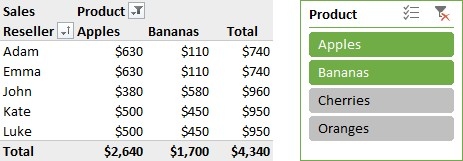
A slicer presents filter choices graphically for a table, PivotTable, or PivotChart. The source highlights its usefulness in dashboards and summary reports where other people need to change the displayed data. Rather than opening a less obvious filter menu, a reader can select the relevant buttons and see which categories are active. This can make a report easier to explore without asking its creator to rebuild the view.
Check what each control is connected to
The article also discusses connecting a slicer to more than one PivotTable and customizing its style. Those options should follow the report's structure rather than be added purely for appearance. Confirm which summaries respond to the control and whether that behavior matches the labels around it. A slicer is most helpful when its purpose and current selection are apparent, particularly in a dashboard containing several related tables and charts.



















Comments (0)