 SheetWorkflow Guide
Identify the range and the condition
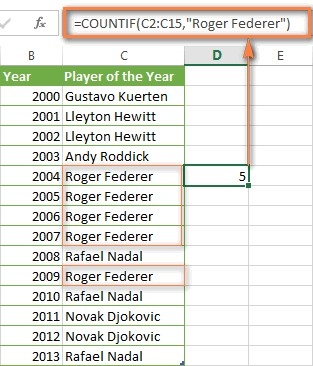
COUNTIF takes a range to inspect and a criterion describing which cells qualify. The source uses examples involving numbers, text, blanks, and other common data types. A condition might require a value above a threshold or text containing a particular word. Start by checking that the range includes the intended records and that the criterion describes the comparison actually needed, because both arguments determine the resulting count.
Keep counting separate from other summaries
COUNTIF answers how many cells satisfy the condition; it does not add their values. If the task involves several requirements or a conditional total, another function or formula structure may be appropriate. The article also discusses repeated and unique values, making it useful for checking a dataset before analysis. Test the formula against a few visible matches so a plausible total is not mistaken for proof that the right question was asked.



















Comments (0)