 SheetWorkflow Guide
Let a rule reveal the pattern
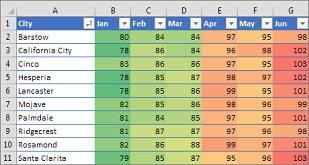
Conditional formatting connects a cell's appearance to its value, helping readers notice trends and differences. The source describes applying rules to selected ranges, named ranges, tables, and supported PivotTable reports. Choose the area and the condition together so the visual emphasis corresponds to the data being interpreted. A rule should answer a recognizable question rather than add a color treatment with no analytical purpose.
Check the additional PivotTable restrictions
PivotTable values introduce considerations that do not apply identically to an ordinary range. For example, some unique or duplicate-value rules are unavailable in the Values area. Formatting can also follow the report's hierarchy and remain associated with fields as the layout changes. Review the scope after rearranging a pivot. The usefulness of a rule depends on which values it now covers, not merely on whether the colors still appear in the report.



















Comments (0)