 SheetWorkflow Guide
Confirm the range and its labels
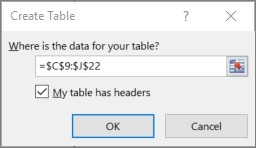
The source demonstrates selecting a cell in an existing dataset and using Insert, Table. Check the proposed range and indicate that the table has headers when that is the case. Headers are especially important for accessibility because screen readers use them to navigate the information. A table should make the records easier to understand for everyone rather than simply add a more polished color treatment.
Give the structure a meaningful name
After creating the table, replace its generic name with one that explains the contents, such as a recognizable employee-list label. Descriptive names help with navigation through the Name Box or Go To commands and can make formulas easier to interpret. Think about naming and formatting together: both communicate what the table contains and how it should be used. A consistent structure reduces reliance on someone knowing the workbook's history in advance.



















Comments (0)