 SheetWorkflow Guide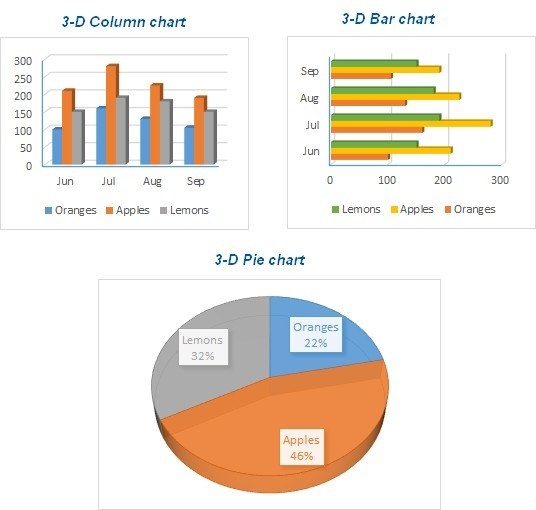
Match the symbols to the comparison
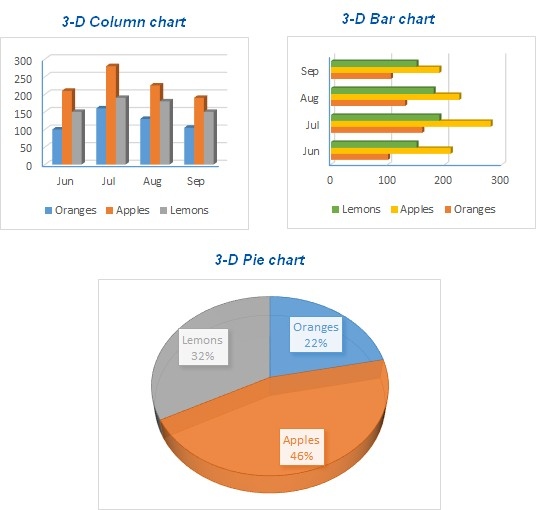
Excel charts can represent numeric information through bars, columns, lines, slices, and other visual forms. The source emphasizes understanding which chart types suit the data before spending time adjusting individual elements. A chart that looks elaborate can still communicate the wrong relationship. Decide whether the task concerns comparisons, change over time, or composition, and let that purpose guide the first choice.
Reuse a useful design without ignoring new data
The article covers moving and resizing charts, combining types, and saving a chart as a template. A template can help maintain a consistent presentation, but the new dataset still needs appropriate labels, series, and scale. Review those components whenever a design is reused. The aim is to make the numeric information easier to understand, with formatting supporting the message rather than becoming the reason for choosing a particular graph.




















Comments (0)