 SheetWorkflow Guide
Color can make a spreadsheet easy to scan, but ordinary Google Sheets formulas do not automatically treat a cell's fill as a calculation criterion. Ablebits describes its Function by Color tool as a way to count or sum entries that share a chosen background or font color. The method requires the add-on rather than a native color-counting function.
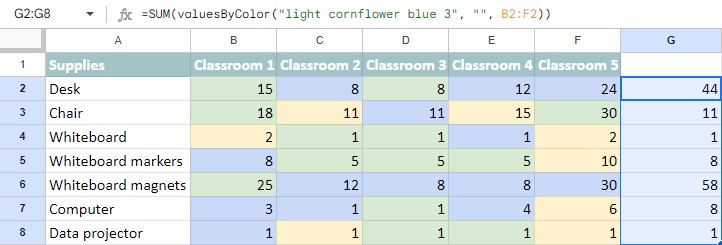
Select the data range, identify a sample cell with the required formatting, and choose the calculation. The tool can summarize the whole selection or produce separate results for rows and columns. A count of nonempty text entries needs an appropriate operation such as COUNTA; adding values instead requires numeric data. Check both the selected colors and output location before applying the calculation.



















Comments (0)