 SheetWorkflow Guide
Column order can make a worksheet easier to read when related fields sit together. In Google Sheets, select a column and use the Edit menu's move command to shift it left or right. Dragging the column heading offers another way to reposition it, with the placement indicator showing where it will land.
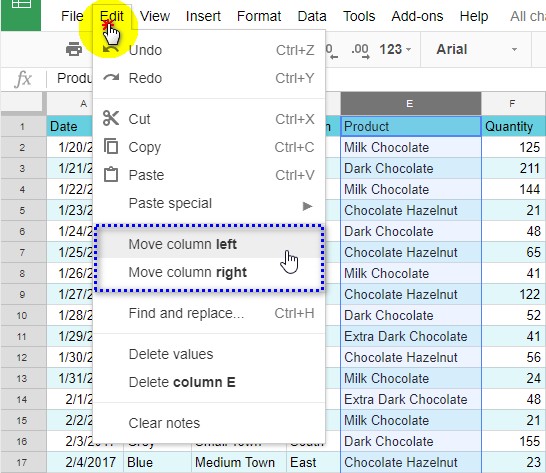
Moving a column is different from merging cells. A merge can retain only the value from the leading cell, which makes it unsuitable for combining several populated fields. Use a text formula when the goal is to join names or descriptions while preserving their contents. Review the complete table after rearranging columns so that headings, values, and related calculations still express the intended structure.



















Comments (0)