 SheetWorkflow Guide
Organize the choices before building the controls
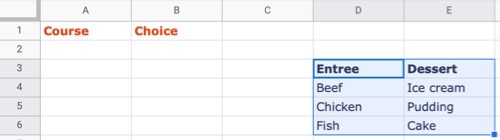
A dependent dropdown changes its available options according to a choice made in another cell. The source gives examples such as product attributes or categories with different items. Begin by creating the category headers and their associated lists, either nearby or on another sheet. The data structure needs to be clear before the dependent controls can guide users through the intended sequence.
Use consistent range names and labels
The article's method names the ranges containing the second-level options, with names corresponding to the initial choices. This relationship lets the first selection determine which list becomes relevant. Check the spelling and naming carefully, because a dependent structure relies on those connections. Test each initial choice and confirm that the second list contains only the intended options. The result can reduce irrelevant selections, but it still depends on maintaining the source lists correctly.



















Comments (0)