 SheetWorkflow Guide
Use conditional formatting for a visible review
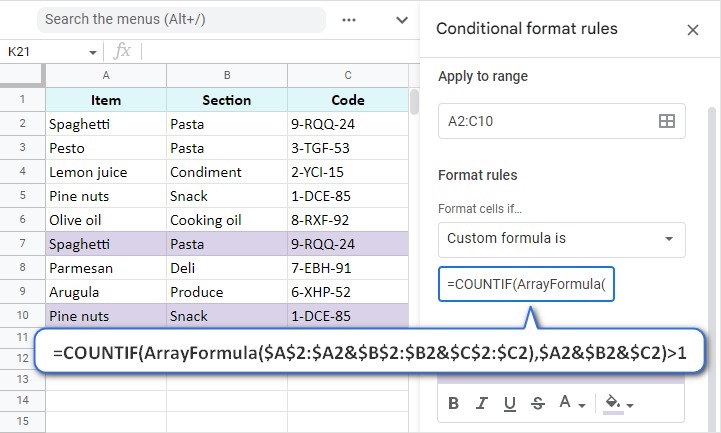
Conditional formatting can make duplicate values stand out while leaving the records intact. The source uses COUNTIF-based rules for repeats within one column and related approaches for matches between columns or across a larger range. This is useful when someone needs to inspect the repetitions before choosing whether any rows should be removed. The highlighted view adds information without immediately changing the dataset.
Distinguish matching cells from matching whole rows
A repeated value in one field does not necessarily mean the entire record is a duplicate. The article uses COUNTIFS when several columns need to agree and also distinguishes rules that include or exclude first occurrences. Match the formula to the actual definition of a duplicate and check its fixed and relative references. Otherwise, a visually convincing highlight can still be answering the wrong question about the table.



















Comments (0)