 SheetWorkflow Guide
An Excel trendline represents the general direction of data rather than connecting every actual observation. It can be straight or curved depending on the chosen model. The guide describes this as a useful way to inspect movements over time or relationships between variables.
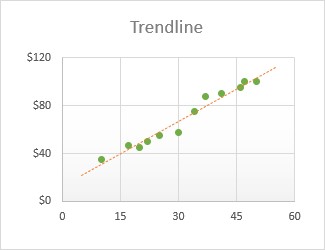
Trendlines are available only for suitable chart types; stacked and three-dimensional charts are among the unsupported cases discussed. Choose a model that fits the analytical question and examine the observations as well as the fitted line. A smooth visual pattern should not be interpreted as a guarantee that future values will follow it.



















Comments (0)