 SheetWorkflow Guide
Excel for Mac creates sparklines from a selected data range and an output location. Choose the desired sparkline form from the Insert controls, then place the result near the values it represents. A compact chart beside a row can reveal movement while leaving the underlying numbers available for inspection.
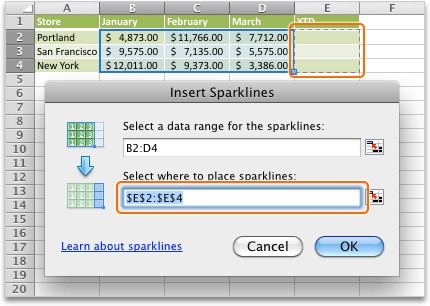
The source and destination dimensions must fit the requested arrangement. If Excel reports inconsistent ranges, review the number of input series and output cells before changing the data itself. After creation, use the sparkline formatting controls to improve visibility and confirm that copied results still refer to the intended rows.



















Comments (0)