 SheetWorkflow Guide
Creating a sparkline requires both the source data range and the worksheet location where the small chart should appear. Excel can display line, column or win/loss sparklines, allowing a compact view of changes without inserting a full chart object. Choose a location beside the series so the relationship remains easy to follow.
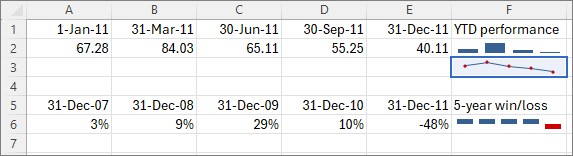
After checking the initial sparkline, copy or fill it into neighboring rows for comparable series. Text can share the destination cell and appear over the chart background, so inspect the combined display for readability. Consistent placement and clear labels make a group of sparklines easier to scan.



















Comments (0)