 SheetWorkflow Guide
Excel can combine separate first-name and last-name columns using the ampersand operator or a concatenation function. The joining expression needs an explicit space between the two fields; concatenating the cell references alone would run the names together.
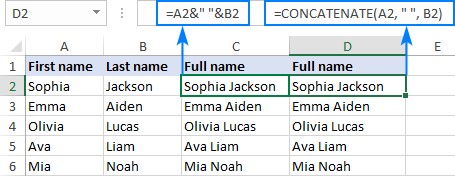
The Ablebits guide also discusses Flash Fill and an optional merging tool. Choose a formula when the combined result should stay connected to its inputs. Review records with missing components or additional name parts before replacing separate fields. A display name is useful, but retaining structured source columns can make later sorting and personalization easier.



















Comments (0)