 SheetWorkflow Guide
ISTEXT checks whether an Excel value is text and returns TRUE or FALSE. ISNONTEXT performs the complementary type check, returning TRUE for nontext values such as numbers, dates, blanks, or errors. These functions inspect the underlying type rather than whether the display looks like a word or number.
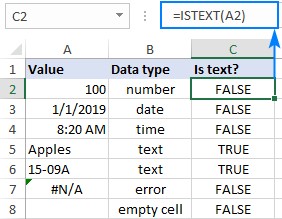
This distinction helps diagnose mixed imported columns. A sequence of digits stored as text can behave differently from a numeric amount even when both look similar. Use the type checks to identify affected records before applying a conversion, and retain text when leading zeros or identifier formatting carry meaning.



















Comments (0)