 SheetWorkflow Guide
Nested SUBSTITUTE functions can perform several text replacements in one Excel formula. Each outer function receives the result of the previous replacement. The Ablebits guide uses this approach for changes such as expanding abbreviated location names into their full wording.
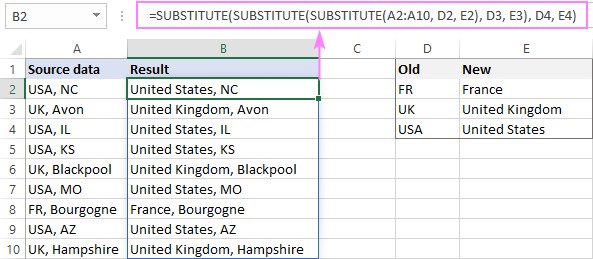
Keep a clear mapping of old and new values and consider whether one replacement creates text that a later rule also matches. Order can therefore affect the final result. Test a sample containing overlapping strings before applying the transformation to an entire dataset. Retain the original column while reviewing whether the expanded wording remains accurate.



















Comments (0)