 SheetWorkflow Guide
An ordinary Excel comparison such as A1=B1 ignores differences in letter case and returns TRUE or FALSE. That may suit names entered with inconsistent capitalization, but it is inappropriate when uppercase and lowercase distinguish identifiers. A case-sensitive comparison needs a different formula.
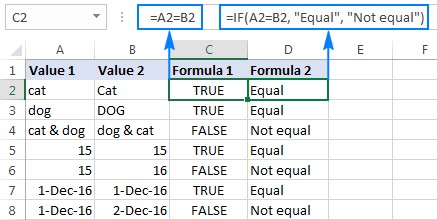
The Ablebits guide also considers string length and character-occurrence comparisons, which test other kinds of similarity. Define the discrepancy the cleanup needs to detect before selecting a formula. Two strings can share a length yet contain different text, so a convenient numeric check should not be mistaken for a complete match test.



















Comments (0)