 SheetWorkflow Guide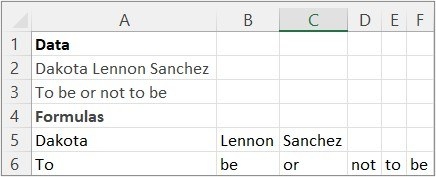
Choose where the result should spill
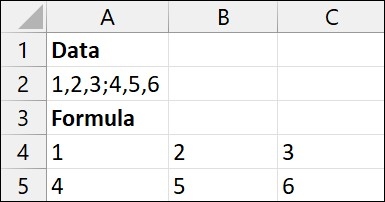
TEXTSPLIT divides a text value using column or row delimiters. The source describes it as a formula counterpart to the Text to Columns wizard, with options to split across columns, down rows, or both. Begin with the text and the delimiter that marks the intended boundaries. A formula-based result is useful when the output should remain connected to the original cell rather than be produced by a one-time manual operation.
Review the optional behavior
The function can control how consecutive delimiters, case sensitivity, and missing output values are handled. Multiple delimiters can be supplied through an array constant. These choices affect the shape and meaning of the result, so test entries with unusual spacing or different separators as well as the simplest example. Check availability in the Excel version being used before making the workbook depend on a newer text function.




















Comments (0)