 SheetWorkflow Guide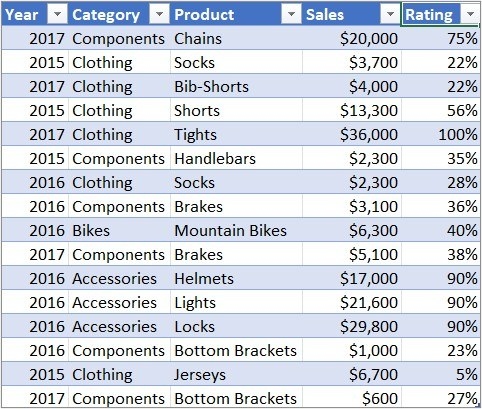
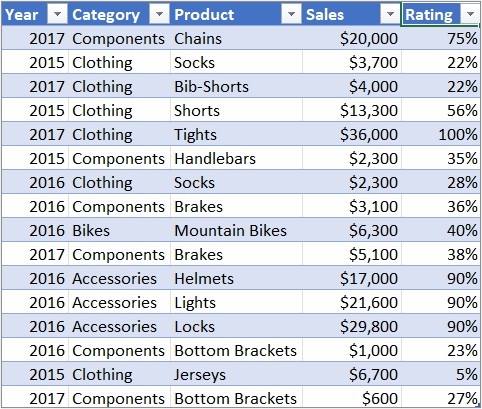
Create the PivotTable foundation first
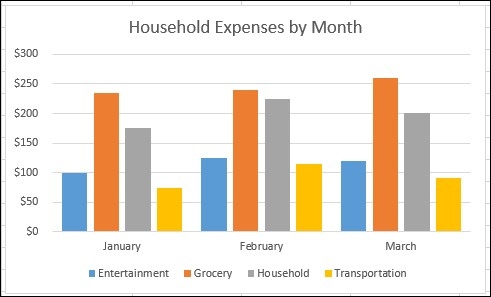
The source explains that Excel for Mac and the web begin the PivotChart process with a PivotTable. Once the summary exists, select a cell within it and insert a supported chart. On Mac, the article identifies column, line, pie, and radar charts for this purpose and notes that some other types are not supported in the described workflow. Check the actual platform instead of assuming every ordinary chart behaves as a pivot chart.
Keep the chart and summary in agreement
Moving fields or changing filters in the pivot changes the information displayed by the chart. Slicers can also participate in this interaction. That relationship is useful for exploring a dataset, but readers need to know which selection produced the current view. Review the labels and the active filters after each change. The chart should communicate the summarized information clearly rather than conceal the assumptions behind an attractive visual.




















Comments (0)