 SheetWorkflow Guide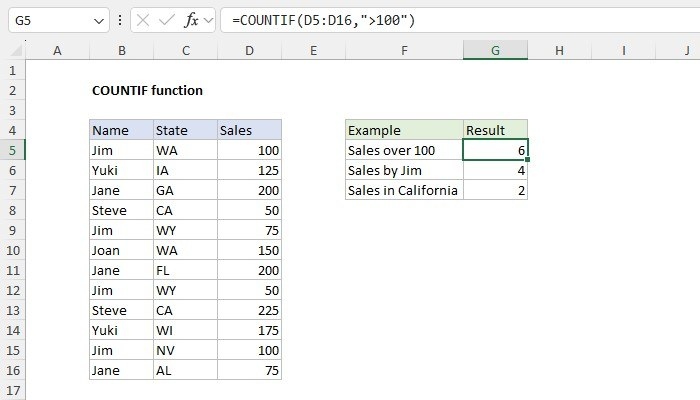
Use one condition against an actual range
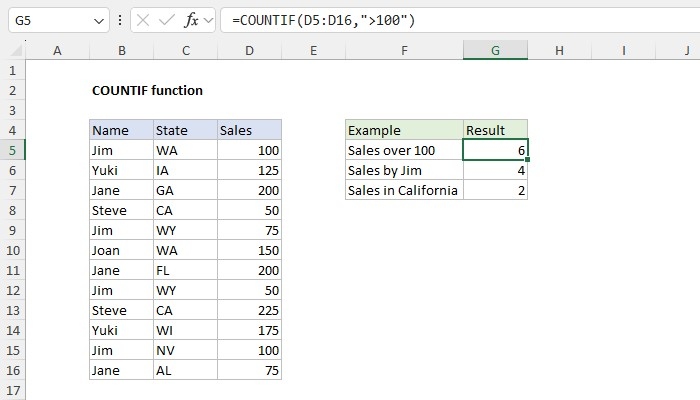
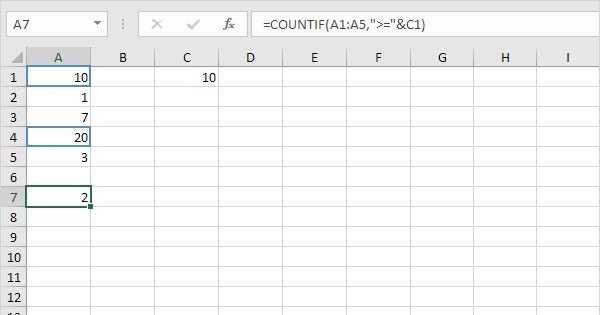
COUNTIF counts cells meeting a specified condition, with one argument for the range and another for the criterion. The source emphasizes that the function requires an actual range for its first argument rather than an arbitrary array expression. It works with common values such as dates, numbers, and text, making it useful for many routine checks across a workbook.
Choose another structure for several conditions
Comparison operators and wildcards allow a criterion to express more than a literal value, but COUNTIF still evaluates one condition. COUNTIFS is the corresponding option when several requirements need to be tested together. Check those differences before making the formula more complicated. Begin with a simple case, verify what the criterion matches, and then extend only as the task requires. Understanding the input restrictions helps explain errors that would otherwise appear unrelated to the data.





Comments (0)