 SheetWorkflow Guide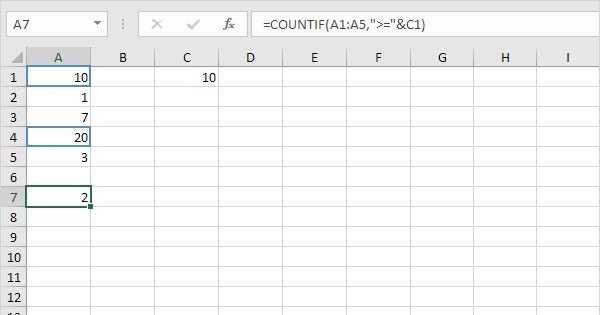
Connect comparison symbols to the tested value
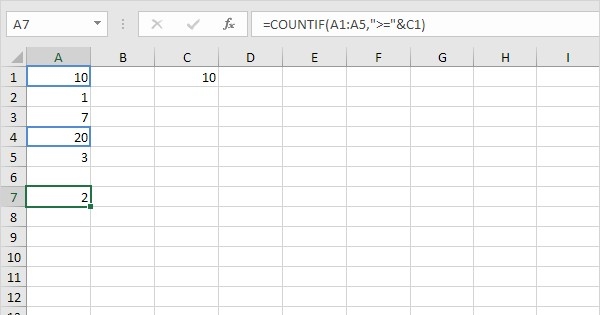
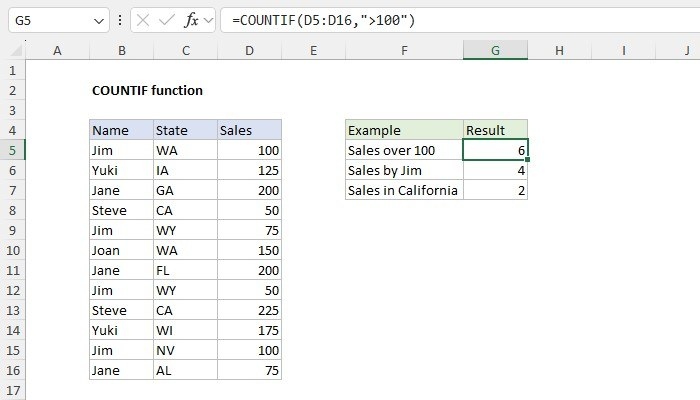
COUNTIF evaluates one criterion over a range. The source demonstrates exact numeric matches as well as comparisons such as greater than or equal to a threshold. When the threshold is stored in another cell, an ampersand can join the comparison symbol to that referenced value. This keeps the condition flexible while making the relationship between the operator and the input explicit.
Use wildcards only when partial text is intended
For text comparisons, quotation marks and wildcard characters affect what counts as a match. A question mark represents one character, while other patterns can broaden a search beyond an exact label. Choose that behavior deliberately and inspect a few examples, including entries that should not qualify. The article's examples show that small changes in a criterion can produce a different count even when the range remains unchanged.





Comments (0)